Cloudflare, Part 1: The Network Under Everything

I've spent some time going deep on the Cloudflare platform. Not casually. Actually building things, configuring products, making notes, undoing things that broke, and going back to the documentation when the mental model I'd built didn't match what I was seeing on screen. This blog is part of that process; it runs on Cloudflare, and some of the products I'm going to describe here are the same ones keeping it operational. I'll leave the specifics of my own setup out of this because the architecture isn't the story, and mapping it out publicly would defeat the point of having built it the way I did.
What I will do is explain what Cloudflare actually is and how it works. The real version, not the "it's just a CDN" shorthand that ends the conversation before it starts.
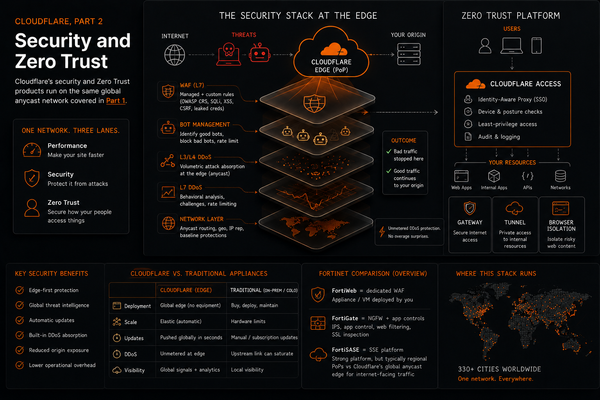
This is Part 1. The network itself: how Cloudflare is structured, how DNS works in their ecosystem, what happens to your TLS traffic at the edge, CDN basics, and the products that operate at the L3 and L4 boundaries before you get into the security stack. Part 2 covers WAF, DDoS, Zero Trust, and the full Cloudflare One platform.
I used AI tools to help turn my study notes into blog format. The content, testing, and conclusions are mine.
What Cloudflare Actually Is
Not a CDN. That's where most people stop, and it undersells the actual structure by a significant margin.
Cloudflare is a global network. As of this writing, they operate in over 330 cities across the world. Every Cloudflare product, the CDN, the WAF, the DDoS mitigation, the Zero Trust stack, runs on that same underlying network. That detail matters because it changes how you think about any individual product. The network is the substrate. Understanding it first makes the product catalog coherent instead of just a list of features competing for your attention.
The platform roughly splits into three lanes: performance products (make your site faster), security products (protect it from attacks), and Zero Trust products (secure how your people access things). All three run on the same infrastructure. That's the pitch. One global network, not a collection of siloed appliances bolted together after the fact.
Anycast: How Traffic Gets Where It's Going
Cloudflare runs anycast. This is the architectural decision that makes almost everything else about the platform work the way it does, so it's worth understanding before anything else.
In a standard unicast network, an IP address points to one specific server in one specific location. You resolve a hostname, you get an IP, your packets go to that place. If that place is in Virginia and you're in Tokyo, your packets travel across the planet and back. That's how most things work.
Anycast changes the model. The same IP prefix is advertised simultaneously from every Cloudflare data center. Your packets get routed toward the nearest one based on BGP's path selection process, which roughly correlates to fewest hops rather than literal geographic distance. The result is that you land at the Cloudflare point of presence selected by Internet routing and Cloudflare's traffic engineering, which is often nearby but not always the geographically closest location.
Two things follow from this that Cloudflare's entire platform depends on.
First, latency is minimized structurally. Traffic never travels farther than necessary to reach the Cloudflare edge. Whatever happens after that, routing to origin, caching, filtering, is Cloudflare's problem to optimize within their own network.
Second, volumetric attacks get distributed across the edge instead of converging on a target. If someone throws 500 Gbps at a Cloudflare-protected IP, that traffic doesn't funnel into a single scrubbing center. It disperses across Cloudflare's edge, with attack traffic absorbed closer to its sources instead of being delivered as one concentrated flood to the customer's infrastructure. This is why Cloudflare can offer unmetered DDoS protection without it being a marketing claim they can't back up. The architecture makes it physically possible.
Traditional on-prem DDoS mitigation works until the upstream link saturates. A FortiGate with anti-DDoS policies, a dedicated scrubbing appliance in your rack, both are operating on traffic that's already arrived at your facility. If the ISP is delivering 200 Gbps of attack traffic to your building, your equipment sees 200 Gbps before it filters anything. Anycast inverts this. The traffic disperses before it gets near your infrastructure.
DNS: Cloudflare's Two Separate Roles
Cloudflare operates in DNS in two distinct capacities, and conflating them is one of the more common points of confusion about how the platform works.
Authoritative DNS is when Cloudflare manages your zone. You delegate your domain's nameservers to Cloudflare's NS records, and from that point Cloudflare answers DNS queries for your domain definitively. It is the authoritative source. When someone queries your domain, the answer comes from Cloudflare's infrastructure. The DNS dashboard in Cloudflare's UI is managing this: you add A records, CNAMEs, MX records, TXT records there, and Cloudflare serves them.
Recursive DNS is 1.1.1.1. This is Cloudflare's public resolver. When a device queries 1.1.1.1, Cloudflare acts as a middleman, traversing the DNS hierarchy on your behalf from root servers down to the authoritative nameserver for whatever hostname you asked about, and returning the answer. It's privacy-focused (no client IP logging), fast (consistently at the top of resolver benchmarks), and supports DNS-over-HTTPS and DNS-over-TLS for encrypting the queries themselves.
These two roles are independent. You can use 1.1.1.1 as your resolver without hosting any domain on Cloudflare. You can have your domain on Cloudflare's authoritative DNS without using 1.1.1.1. The same company runs both, but they're separate services solving different problems.
CNAME flattening is a Cloudflare DNS feature that comes up regularly. Standard DNS doesn't allow a CNAME record at the zone apex, the root of your domain, example.com with no subdomain. A CNAME at the apex would conflict with required records like SOA and NS, so RFC 1034 prohibits it. Cloudflare gets around this by resolving the CNAME internally at query time and returning an A record to the client. This lets you point your root domain to a CDN or load balancer hostname without needing a static IP. Standard DNS can't do this. It's one of those small things that sounds minor until you need it.
Proxied records versus DNS-only records (the orange cloud and the gray cloud in the dashboard) are the most operationally relevant DNS concept for anyone actually using Cloudflare day to day.
A gray cloud record is DNS-only. Cloudflare answers the query and returns your origin server's real IP address. Traffic goes directly from the client to your server. Cloudflare is not in the traffic path at all.
An orange cloud record is proxied. Cloudflare answers the query with one of its own anycast IPs, not your server's IP. Traffic arrives at the Cloudflare edge, gets processed according to whatever you've configured, and Cloudflare makes a separate connection to your origin. Your server's real IP is not exposed to the internet. The practical implication: hostnames that should not route through Cloudflare's proxy, such as mail-related hostnames, third-party validation hostnames that need a specific DNS response, or services that cannot tolerate the HTTP proxy path, should stay DNS-only. Accidentally proxying something that shouldn't be proxied is a common source of mysterious connectivity failures.
TLS: What Cloudflare Does to Your Encrypted Traffic
TLS is the protocol providing encryption between client and server. Most people see it as the padlock in the browser. Here's what Cloudflare specifically does with it, because the Cloudflare model introduces something worth understanding.
The handshake, briefly: the client sends a ClientHello containing supported TLS versions, cipher suites, and a random value. The server responds with a ServerHello selecting the parameters and presenting its certificate. The client validates the certificate against a trusted certificate authority. Both sides derive session keys from the exchange. Everything after this is encrypted using those session keys.
SNI (Server Name Indication) is a TLS extension that lets the client specify which hostname it's trying to reach inside the ClientHello, before the handshake completes. This exists because many virtual hosts share a single IP address. The server needs to know which certificate to present before the handshake is finished, and without SNI there's no way to determine that from an IP address alone. With SNI, one IP can serve thousands of domains, each with its own certificate. Cloudflare proxies enormous numbers of domains behind a shared anycast IP pool, so SNI isn't optional; it's foundational to how the multi-tenant model works.
Cloudflare's termination model is where the interesting part is. When traffic arrives at the Cloudflare edge, Cloudflare terminates the TLS session there. The encrypted tunnel ends at the PoP, not at your origin. Cloudflare decrypts the traffic, does what it needs to do with it (WAF inspection, caching decisions, routing, etc.), and then creates a new encrypted connection to your origin server. You have control over how that second leg behaves.
The encryption modes:
Flexible: Cloudflare decrypts at the edge and sends plaintext HTTP to your origin. The browser sees HTTPS. The connection between Cloudflare and your origin is not encrypted. This is the least secure practical mode and is not appropriate for anything involving logins, personalized data, or sensitive traffic.
Full: For HTTPS visitor requests, Cloudflare decrypts at the edge and re-encrypts to your origin, but it does not validate the origin certificate. Self-signed certificates are accepted. Better than Flexible. There's still an authentication gap because Cloudflare can't verify it's actually talking to your legitimate server.
Full (Strict): Cloudflare decrypts at the edge, re-encrypts to the origin, and validates the origin certificate against a trusted CA. This is the correct setting for any deployment where security matters. Your origin needs a valid certificate, which you can get from Cloudflare's own Origin CA (free, trusted by Cloudflare) or any public CA.
mTLS (mutual TLS) extends standard TLS by requiring the client to also present a certificate. In standard TLS, only the server authenticates itself to the client. In mTLS, both sides authenticate. Cloudflare supports this primarily for API security and IoT scenarios, contexts where username/password or token-based auth doesn't make sense because there's no human initiating the connection. A temperature sensor sending telemetry can't type a password. A client certificate provisioned at manufacturing time can authenticate it.
TLS 1.2 versus 1.3. Version 1.2 requires two round trips before application data can flow. Version 1.3 cuts this to one round trip (1-RTT). More importantly, 1.3 removed cipher suites that don't provide forward secrecy. Forward secrecy means that even if a session key is later compromised, it can't be used to decrypt previously captured traffic. Each session generates a fresh ephemeral key that doesn't persist. Cloudflare defaults to 1.3 where the client supports it.
HSTS (HTTP Strict Transport Security) is a response header that instructs browsers to only connect to a domain over HTTPS for a specified duration (the max-age). Once a browser has seen an HSTS header for a domain, it will refuse to make plaintext HTTP connections to that domain for the entire max-age period, regardless of what your server says afterward. You cannot quickly undo this. If you enable HSTS and then find yourself needing to serve HTTP from the same domain, you're going to wait out the max-age period in every browser that visited during HSTS enforcement. Enable it after your HTTPS configuration is stable and tested, not as a first step.
CDN and Caching
CDN stands for Content Delivery Network. The core concept: cache content at edge locations so that repeated requests don't all travel back to your origin server.
When a request arrives at the Cloudflare edge, Cloudflare checks whether it has a cached copy of the resource. If it does, that's a cache HIT; Cloudflare serves the response from the edge without contacting your origin. If it doesn't, that's a cache MISS; Cloudflare forwards the request to your origin, gets the response, serves it to the client, and caches it for subsequent requests. Your origin only sees traffic on misses.
What gets cached is determined by the cache-control headers your origin sends, or by cache rules you define in the Cloudflare dashboard. Static assets like images, CSS, JavaScript, and web fonts are the natural candidates. Dynamic content, authenticated responses, anything that varies per user should generally not be cached at a shared edge layer.
Cloudflare adds a cf-cache-status response header you can inspect. It tells you whether a given response was a HIT, MISS, EXPIRED, BYPASS, or DYNAMIC. When you're troubleshooting why content isn't being served from cache, this header is the first thing to check. BYPASS means a rule is explicitly preventing caching. DYNAMIC means Cloudflare has determined the content shouldn't be cached based on headers or content type. EXPIRED means the cached copy existed but the TTL elapsed before a new request arrived.
The performance benefit scales with traffic. A site with good cache configuration and heavy traffic can serve the majority of requests from the edge, with origin requests representing a small fraction of total volume. This reduces origin server load and end-user latency at the same time.
Argo Smart Routing
Cache misses and uncacheable requests have to reach your origin. By default, that path goes over the public internet, subject to whatever routing decisions BGP happens to make on a given day. BGP was designed for reachability, not performance. The path with the fewest AS hops is often not the fastest path in practice.
Argo addresses this. Cloudflare's global network gives it more path options than the public Internet route your request would otherwise take. Argo uses real-time latency telemetry across this network to find the optimal path from the edge PoP where a request arrived to the PoP nearest to your origin, routing over Cloudflare's infrastructure rather than the public internet. Congestion, asymmetric routing, and peering disputes that slow down public internet paths don't apply in the same way.
Argo is a paid add-on, metered on bandwidth. The benefit depends on geography and your routing baseline. Long-haul traffic, a request from Europe to an origin in Australia, has more to gain than a regional request where the public internet path is already near-optimal. Worth evaluating against your actual traffic patterns rather than assuming uniform improvement.
Spectrum: Layer 4 Proxy for Non-HTTP
The WAF, CDN, and most Cloudflare products operate at Layer 7. They understand HTTP. Spectrum extends Cloudflare's reverse proxy and DDoS protection to Layer 4, meaning any TCP or UDP application.
If you're running a game server, SSH access on a non-standard port, a custom protocol, or anything that isn't HTTP/HTTPS and you want Cloudflare's network in front of it, Spectrum is the product. Cloudflare proxies the TCP or UDP session, applies L3/L4 DDoS mitigation, and hides your origin IP. It doesn't inspect application payloads the way the WAF does; it operates below the application layer, so it can't. But it does absorb volumetric attacks and provides origin IP protection for protocols that can't use the standard HTTP proxy path.
OSI layer mapping is worth committing to here because it comes up constantly when explaining Cloudflare products:
- L3: Magic Transit (covered below)
- L4: Spectrum
- L7: WAF, CDN, Access, Gateway HTTP policies
- L3/L4 and L7: DDoS mitigation (volumetric at L3/L4, application-layer floods at L7)
- L7: Argo Smart Routing
Knowing which layer each product operates at is the difference between a technical explanation and a product brochure recitation.
Magic Transit: Layer 3 at Enterprise Scale
Magic Transit is for enterprises that operate their own IP address ranges and need Cloudflare to function as their upstream DDoS scrubber.
The setup: the customer's IP prefixes are advertised into Cloudflare's anycast network via BGP. Traffic destined for the customer's IPs now hits the Cloudflare edge first, globally, before it ever reaches the customer's facility. Cloudflare applies L3/L4 DDoS mitigation at the edge, then tunnels the clean traffic back to the customer's network over GRE or IPsec tunnels.
The customer's upstream link never sees the attack traffic. It's absorbed at the Cloudflare edge, cleaned, and only legitimate packets complete the journey. The return tunnel carries a fraction of the volume that a direct attack would have delivered.
Contrast with on-prem scrubbing: a FortiGate with anti-DDoS policies, or a dedicated scrubbing appliance in the customer's rack, operates on traffic that has already arrived. If the ISP is delivering 300 Gbps of attack traffic to the building, the hardware inside sees 300 Gbps before any filtering happens. That traffic also consumes expensive transit bandwidth. Magic Transit intercepts before any of that occurs.
Magic Transit is not for individuals or small businesses. It requires routable IP space and BGP-level routing coordination, which is why it is aimed at ISPs, large enterprises, and organizations with a serious network footprint. But it's the clearest illustration of what Cloudflare's anycast network actually enables at scale.
What Part 2 Covers
Part 1 is the foundation. The network, the DNS model, TLS, CDN, and the L3/L4 products. None of the security stack makes full sense without this layer underneath it.
Part 2 is where the security and Zero Trust products live: WAF and web application attacks (SQLi, XSS, CSRF), DDoS from a security posture rather than just a network design perspective, Bot Management, and then the full Zero Trust stack, Access, Gateway, WARP, Tunnel, CASB, Browser Isolation, Email Security, and Cloudflare One as a SASE platform. Hope to see you there!