Cloudflare, Part 2: Security and Zero Trust
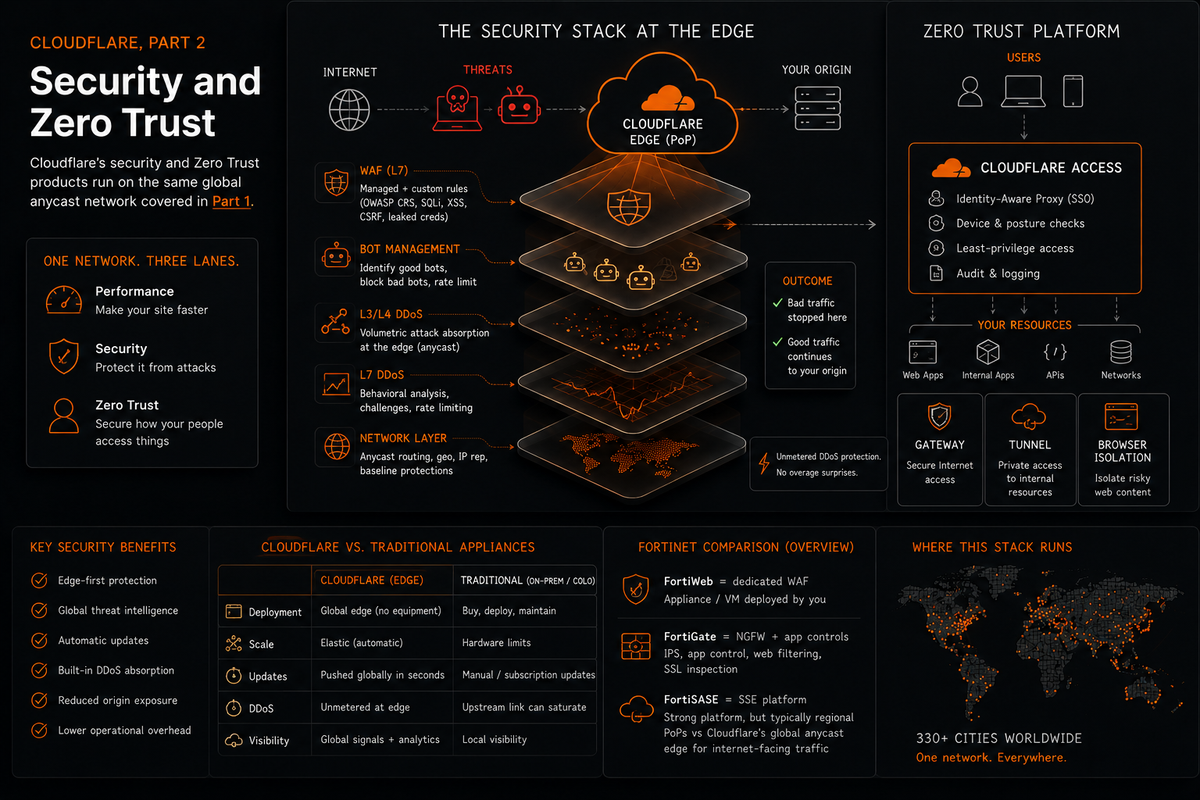
Part 1 covered the network itself: anycast, DNS, TLS, CDN, and the products that operate at L3 and L4. If you haven't read it, the short version is that Cloudflare is a global anycast network, and the security products covered in this post only make sense once you understand the infrastructure they run on.
This part is the security stack: WAF, DDoS, Bot Management, and then the full Zero Trust platform. The Fortinet comparisons get more specific here. I have real context on that side of the comparison, and it's useful for explaining why the architectural differences actually matter rather than just asserting that they do.
The Web Application Firewall
The WAF sits at Layer 7. It reads HTTP traffic (request headers, URIs, request bodies) and decides whether to allow, challenge, or block each request based on rules. Two categories of rules matter: managed rules and custom rules.
Managed rules are maintained by Cloudflare. The most important set is the OWASP Core Rule Set, a community-maintained collection of signatures covering the most common web application attacks. Cloudflare also maintains its own ruleset, which gets updated as new exploits emerge in the wild. You don't write managed rules. You enable them, tune sensitivity thresholds if needed, and let Cloudflare maintain them going forward. Cloudflare also has leaked-credential detection for login flows. It can identify submitted username/password pairs that match known leaked credentials and let you take action before the request reaches your application. It is not checking your user database. It is comparing the submitted credential pair against Cloudflare's leaked-credential detection data in a privacy-preserving way.
Custom rules are what you write yourself. The logic uses Cloudflare's Ruleset Engine: define conditions on request fields (URI path, HTTP method, country of origin, ASN, request headers, body content) and specify an action when they match. Block, challenge, allow, rate-limit, or log. Custom rules exist because your application has attack surface that no generic ruleset will anticipate, your specific API endpoints, your specific authentication flows, your specific business logic.
The three web attack types that come up in every WAF conversation:
SQL injection. An attacker submits SQL syntax through an input field, expecting the application to pass it unsanitized to a database query. The classic example is a login form where submitting a crafted string as the password manipulates the query logic into returning a valid result regardless of the actual password. WAF managed rules detect known SQLi patterns. The correct fix is parameterized queries at the application layer. The WAF catches attacks in transit but doesn't remediate the underlying vulnerability. These are independent controls.
Cross-site scripting (XSS). An attacker injects JavaScript into a page that executes in another user's browser. Stored XSS: the script gets saved to a database and delivered to every visitor who loads the affected page. A malicious script you submitted in a comment field running in every other user's session is stored XSS. Reflected XSS: the script is embedded in a URL, and the server reflects it back in the response when someone clicks the link. WAF managed rules block known XSS payloads. Content Security Policy headers add a second layer by instructing browsers which scripts are permitted to execute and from which origins. A browser that won't execute inline scripts is less vulnerable even if a payload slips through.
Cross-site request forgery (CSRF). The mechanism is different from the other two and worth understanding separately. CSRF doesn't inject anything into your application. It tricks an authenticated user's browser into making a request the user didn't intend, typically by embedding a malicious form or image tag on an attacker-controlled page. The browser sends the request with the victim's session cookies attached, so your server accepts it as legitimate. The durable fix is application-layer CSRF protection: CSRF tokens, SameSite cookie settings, origin/referrer validation, and careful handling of state-changing requests. Edge controls can still help reduce abuse, but CSRF is not solved by a generic SQLi or XSS WAF rule. The distinction that matters: SQLi and XSS attack the application itself. CSRF attacks the authenticated session. A WAF rule blocking SQLi payloads does nothing against CSRF because the CSRF request looks completely legitimate at the HTTP level.
Fortinet comparison. Fortinet's closest dedicated WAF product is FortiWeb. FortiGate can still provide application-layer protections through security profiles such as IPS, application control, and web filtering, but it is not the same product category as a purpose-built WAF. The architecture difference is the more useful point: Cloudflare's WAF runs at the edge before traffic reaches the customer's infrastructure, while appliance or VM-based controls operate wherever the customer has deployed them. Rule updates in appliance-based environments depend on the update path, device reachability, local configuration, and the customer's deployment process. Cloudflare's WAF runs at the edge, so managed-rule changes can be applied across Cloudflare's infrastructure without the customer sizing, patching, or updating an appliance first. The practical difference is time-to-protection and operational overhead, especially during fast-moving exploit activity.
DDoS: Beyond Absorption
Part 1 covered why anycast makes volumetric DDoS difficult to land at the network level. Here is the product-level breakdown.
Cloudflare's DDoS protection is unmetered. There is no traffic threshold above which you start paying per-gigabit or lose protection. This is worth stating plainly because it eliminates a second-order attack vector: DDoS that becomes financially ruinous to defend against creates an incentive to take your own property down. If a sustained attack generates five-figure cloud egress bills, the attacker doesn't need to take you offline. The bill does. Cloudflare's model removes that calculation from the table.
L3/L4 DDoS is volumetric: UDP floods, ICMP floods, SYN floods, amplification attacks (DNS amplification, NTP amplification, memcached amplification). The anycast network absorbs these because attack traffic disperses across 330-plus PoPs rather than converging on a single target. These attacks are large but structurally simple to identify. They're volume, often from spoofed source IPs, hitting a port repeatedly. Cloudflare drops them at the edge before they route anywhere meaningful.
L7 DDoS requires more care. An HTTP flood looks like legitimate traffic. GET requests from distributed IPs against a valid URL path. No malformed packets, no obvious spoofing, no single source to block. Distinguishing attack traffic from legitimate user traffic at L7 requires behavioral analysis: request rate per IP, request timing patterns, browser fingerprinting, whether the client correctly executes JavaScript challenges, TLS fingerprint matching against the claimed User-Agent. A bot claiming to be Chrome but producing a TLS handshake that no Chrome version generates is identifiable through that mismatch. Cloudflare combines these signals to score requests and apply mitigation without blocking legitimate users.
Rate limiting sits at the intersection of DDoS defense and application abuse protection. You define a threshold (requests per IP per time window against a specific path or matching a rule) and Cloudflare blocks or challenges requests exceeding it. This handles brute force login attempts, credential stuffing, API scraping, and slow-volume HTTP floods that don't trigger volumetric detection because they stay below the threshold for any single signal while still causing damage in aggregate.
Bot Management
Not all automated traffic is malicious. Googlebot crawling your site is bot traffic you want. A credential stuffing operation running 50,000 login attempts per hour using a list of breached passwords is not. Bot Management is the product that distinguishes between them.
Cloudflare assigns a bot score to each request, from 1 to 99. Low scores indicate likely automated traffic. High scores indicate likely human. Cloudflare maintains a list of verified bots (major search engines, uptime monitoring services, known legitimate crawlers) that are allowlisted and excluded from challenge or blocking rules regardless of their score. You write policies based on score thresholds: challenge anything below 30, block anything below 10, always allow verified bots.
The detection signals: JavaScript fingerprinting (does the client execute JS and return the correct result), TLS fingerprinting (does the TLS handshake match what the claimed User-Agent actually produces), behavioral analysis (request timing, interaction patterns, navigation sequencing), and IP reputation data (is this IP associated with known malicious actors, Tor exit nodes, datacenter ranges rather than residential ISPs).
The granular 1-99 bot score and fine-grained policy control are part of Enterprise Bot Management. Lower tiers still have bot-related protections such as Bot Fight Mode or Super Bot Fight Mode depending on plan, but those are not the same as full Enterprise Bot Management. The practical implication for any web property: legitimate automated traffic (SEO crawlers, uptime monitors, CI/CD pipelines hitting health check endpoints) needs to be explicitly accounted for in your bot rules. Aggressive bot blocking without verified bot allowlisting can eventually hurt indexing or cause legitimate crawler issues. Getting that wrong quietly creates problems that are annoying to debug.
Zero Trust: What the Term Actually Means
Zero Trust is deployed as a marketing term with enough frequency that it has nearly lost all signal value. The underlying concept is not complicated.
The perimeter security model assumes traffic inside your network is trustworthy. You put a firewall at the edge, inspect what crosses it, and treat everything inside as safe. VPNs extend this logic: authenticated users connect through the VPN, land inside the network, and have broad access to whatever the network contains. The failure mode is lateral movement. An attacker who compromises one internal system, or who steals one set of valid VPN credentials, is now inside the trusted zone. Reaching adjacent systems requires no further authentication because nothing inside the perimeter is being verified.
Zero Trust removes the concept of a trusted zone. Every access request gets evaluated regardless of where it originates: inside the office, from home, from a hotel WiFi, from a VPN. Evaluation happens against three signals: identity (who is this person or system), device (is this a managed and compliant device), and context (what are they accessing, from where, at what time). Trust is granted per-request, per-application. There is no "inside." Being on the corporate network buys you nothing by itself.
Cloudflare One is the platform that delivers this. Access, Gateway, WARP, Tunnel, CASB, Browser Isolation, and Email Security are the components. The following sections break each one down.
ZTNA vs VPN: The Architecture Difference
Traditional VPN (FortiClient connecting to a FortiGate SSL-VPN gateway, Cisco AnyConnect, GlobalProtect, any of them) grants network-layer access. The user authenticates, a tunnel is established, they receive an IP address on the corporate network. They can now reach whatever is on that network. The scope of access is the network segment, not a specific application. If the corporate network has a file server, a database, an HR system, and a development environment on adjacent subnets, a VPN user with network access can attempt to reach all of them. Whether they succeed depends on internal firewall rules and host-based controls that may or may not exist and may or may not be consistently enforced.
ZTNA grants application-layer access. The user authenticates, and they receive access to one specific application. Not the network. Not adjacent systems. The application the policy authorized them to reach. An attacker who compromises those credentials can access that application. They cannot pivot to other systems because there is no network-layer access granted in the first place. There is nothing to pivot through.
The Cloudflare implementation uses three components:
WARP is the client agent installed on the user's device. It replaces the VPN client. Traffic selected by the WARP device profile routes through Cloudflare's network, where Gateway policies can apply regardless of what network the device is physically connected to. At the office, at home, on airport WiFi, the same policies can apply because the relevant traffic is steered through Cloudflare rather than depending on the user being physically inside the office network.
Access is the policy engine. It defines who can reach which application under what conditions. A policy might specify: allow access to this application if the requesting user's identity matches an allowed email domain, their device has an active WARP session, and it's within business hours. Access evaluates this on every request, not just at session establishment. The authentication flow integrates with an external identity provider via OIDC or SAML (Okta, Azure AD, Google Workspace, whatever the organization uses). The user authenticates with the IdP, Cloudflare validates the resulting tokens, and if all policy conditions are met, Cloudflare issues its own signed JWT. That JWT is stored as a cookie in the browser and validated by Cloudflare on every subsequent request to the protected application. The IdP is only called once per session, not on every request. When the session expires, the user re-authenticates with the IdP.
Tunnel is the connector on the private network side. A lightweight daemon called cloudflared runs wherever your applications are hosted: a server, a VM, a Docker container. It maintains a persistent outbound connection to the Cloudflare edge. When an authorized user's request arrives at Cloudflare after Access validates it, Cloudflare routes that request through the Tunnel to the application. The origin server has no open inbound ports. There is no port forwarding rule on your router. There is no firewall hole allowing inbound connections from the internet. The tunnel connection always originates from your network outbound to Cloudflare, and traffic flows back through that established connection. This is not a minor configuration convenience. It's a meaningful reduction in attack surface. An attacker scanning your external IP will find nothing listening.
The logging difference from VPN is worth stating directly. VPN access logs record an IP address hitting a port. Cloudflare Access logs record who authenticated, to which application, via which identity provider, from which country, at what time, and whether the policy allowed or denied the request. That's identity-aware logging versus network-layer logging. Knowing that a specific named user authenticated to a specific application from a specific country at 3 AM and was denied versus knowing that 198.51.100.42 hit port 443: these are different levels of operational and compliance value.
Gateway: DNS and HTTP Filtering
Gateway is Cloudflare's secure web gateway. It filters outbound traffic from your users: what they're allowed to reach, what gets blocked, what gets inspected.
DNS policies are the first layer. Gateway intercepts DNS queries from devices running WARP and applies filtering before the query resolves. You can block entire categories (malware, phishing, adult content, gambling), create custom block lists for specific domains, and build allowlists for domains that should bypass category filtering. Blocking at DNS is efficient. The connection is never attempted because the query never resolves to an IP. The domain is blocked before any packet goes anywhere. Pi-hole operates on this same principle at home lab scale. Gateway is the enterprise version: centrally managed policy, applied across every enrolled device, with logging and analytics.
HTTP policies operate after DNS resolution, once the connection is established. Gateway can enforce HTTPS on plaintext connections, block file downloads by MIME type, apply DLP rules to outbound content, and inspect URL paths and parameters. Deeper HTTPS inspection requires TLS decryption. In Cloudflare Gateway, that depends on the device trusting the Cloudflare root certificate or a configured custom certificate, allowing Gateway policies to inspect HTTPS traffic such as full URLs, paths, request attributes, and content where policy allows. This is the same basic enterprise TLS-inspection model used by secure web gateways, but delivered through Cloudflare's Zero Trust stack rather than a physical proxy appliance in the office.
The combination of WARP and Gateway is the specific thing that changes the architecture versus traditional network security. DNS filtering and web proxies on-prem protect devices that are on the corporate network. A user working from home is outside the perimeter. With Gateway, traffic routing through WARP is filtered regardless of network location. The policies follow the device, not the building.
CASB: Visibility into SaaS
CASB stands for Cloud Access Security Broker. It addresses a specific problem: organizations use SaaS platforms (Google Drive, Salesforce, GitHub, Slack, Box, Microsoft 365) and security teams often have limited visibility into what's happening inside those platforms at the data level.
Cloudflare's CASB integrates with SaaS APIs to scan for policy violations and misconfigurations. Publicly accessible Google Drive folders that should be internal. GitHub repositories with secrets committed to version control. Salesforce records visible to more users than intended. DMARC configurations that don't match documented policy. CASB identifies these by querying the SaaS platform APIs directly and comparing the findings against your defined policies.
This is the API-based scanning model, which differs from inline CASB. Inline CASB proxies traffic between users and SaaS applications, inspecting it in real time. API-based CASB talks directly to the SaaS API on a scheduled or event-triggered basis and doesn't require routing user traffic through a proxy. The trade-off: API-based is less disruptive to deploy and has zero latency impact on end users, but it only surfaces what the SaaS API exposes and has some lag relative to inline interception.
Browser Isolation
Remote Browser Isolation moves web browsing off the end user's device and onto a server that Cloudflare controls. The user's browser connects to a Cloudflare-hosted browser that does the actual fetching, execution, and rendering of web content. Active web content executes remotely instead of on the user's device. The user continues browsing normally, but risky page code is isolated away from the local browser environment rather than being allowed to execute directly on the endpoint.
The security rationale is straightforward. Most browser-based malware requires code execution in the local browser environment. If the browser executing that code is a disposable remote instance that resets between sessions, local device compromise via web content becomes significantly harder. A drive-by download that executes in the remote browser never reaches the user's machine.
Gateway policy controls when isolation applies. You can configure it for specific site categories (uncategorized domains, recently registered domains, known high-risk categories) without applying it to all browsing. Universal isolation has latency overhead because the rendering is remote. Targeted isolation, applied selectively to traffic that actually warrants it, is the practical deployment model for most organizations.
Email Security
Cloudflare acquired Area 1 Security in 2022. It now operates as Cloudflare Email Security. The product targets phishing that bypasses traditional email security gateways.
The detection architecture is preattack. Rather than waiting to scan messages after they're sent, Area 1 continuously crawls attacker-controlled infrastructure before it activates (phishing domains, credential harvesting pages, phishing kit deployments, sending infrastructure). By the time a phishing email arrives in a mailbox, the infrastructure it originated from has already been analyzed and a disposition has been made. The point is not that message scanning disappears. The point is that Cloudflare's model adds preattack intelligence about phishing infrastructure before the email lands, instead of relying only on scanning the message at delivery time.
Standard email security products rely primarily on signature matching and sender reputation. This works against known infrastructure. It works less well against campaigns launched from freshly registered domains and newly provisioned sending IPs with no established reputation, which is exactly the setup a targeted attacker uses precisely because it avoids reputation-based detection. The preattack crawling model is built for this gap.
Email Security integrates with Microsoft 365 and Google Workspace via API scanning or by routing mail through Cloudflare's infrastructure via MX record changes. DMARC management is surfaced in the Cloudflare dashboard for domains on the platform, giving you a single place to monitor DMARC enforcement status and move from monitoring to enforcement as legitimate sending sources are confirmed.
Cloudflare One: The SASE Platform
All of the above (Access, Gateway, WARP, Tunnel, CASB, Browser Isolation, Email Security) is Cloudflare One. It's Cloudflare's SASE platform.
SASE stands for Secure Access Service Edge, and the networking series post on SASE architecture covers it in full if you want the detailed breakdown. The short version: SASE converges network security functions (ZTNA, SWG, CASB, FWaaS) with WAN edge capabilities and delivers them as a cloud service from a network with global PoP coverage. Cloudflare One delivers the security functions. Magic WAN handles the SD-WAN edge piece, routing branch office traffic through Cloudflare's network.
The unified platform argument is real. All of these components run on the same global edge, share the same policy engine, and produce logs in the same place. No stitching together point solutions with different management consoles, different log schemas, and different update cycles. Whether the unification argument outweighs other factors depends on what you're replacing and what you already own.
Cloudflare One versus FortiSASE. Fortinet's SASE approach is built around FortiSASE as a cloud-delivered service powered by FortiOS and the Fortinet Security Fabric, with FortiClient endpoint access, secure internet access, secure private access, SaaS security, and integration paths for organizations with existing Fortinet SD-WAN deployments. That lineage is a real strength for Fortinet-heavy customers: policy, telemetry, and security controls can extend from an existing Fortinet estate into the cloud-delivered model without starting from scratch. The Fortinet design reflects a platform-first approach to SASE through the Security Fabric, while Cloudflare built its SASE functions natively on its edge network from the start.
The honest version of this comparison: Fortinet's approach makes more sense for organizations with existing Fortinet investments, complex hardware integrations, or compliance requirements that favor on-premises control. Cloudflare's approach makes more sense for organizations prioritizing operational simplicity, distributed workforces, and avoiding infrastructure management overhead. Calling one strictly better requires knowing which constraints actually apply.
Workers: Serverless at the Edge
Workers is Cloudflare's serverless compute platform. Code runs on Cloudflare's global network, close to the incoming request rather than in one fixed region, in JavaScript, TypeScript, Rust via WebAssembly, or Python. The runtime is V8, the same engine Chrome uses, not a containerized process or a VM. The V8 isolate model avoids the traditional VM/container cold-start pattern and starts much faster than container-style serverless runtimes. Requests are processed at the PoP in milliseconds.
The SE relevance is straightforward: customers ask about it, and it's part of the platform story even for customers who didn't originally buy Cloudflare for compute. Common use cases are request transformation before traffic hits origin, A/B testing logic, API routing and authentication, bot mitigation rules that need custom logic beyond what the WAF Ruleset Engine supports.
If a customer currently runs business logic in a Lambda function in a single AWS region and their users are globally distributed, moving that logic to Workers means it executes near the user rather than in one data center. The latency reduction for globally distributed traffic is significant.
Workers KV is the key-value storage layer, eventually consistent, globally distributed. Durable Objects handle stateful compute for cases requiring strong consistency across requests. R2 is Cloudflare's object storage layer, S3-compatible and without the egress fees that make S3 expensive at meaningful scale. Egress from R2 to the internet is free.
Workers is not typically what brings enterprise customers to Cloudflare. It's often what makes them difficult to migrate away from once they've built logic there.
The Platform's Actual Goal
Cloudflare's products, taken together, are trying to accomplish one thing: put their network between your infrastructure and everything that interacts with it.
Public internet traffic arrives at the Cloudflare edge, gets filtered through the WAF and DDoS mitigation, cached if cacheable, and forwarded to your origin through a Tunnel with no inbound ports open. Employee traffic leaves through WARP, gets filtered by Gateway DNS and HTTP policies, reaches internal applications through Access with full identity-aware logging. SaaS usage gets scanned for misconfigurations and data exposure by CASB. Email gets analyzed before it reaches the inbox. Edge compute logic runs in Workers before requests touch your servers.
The perimeter doesn't disappear. It moves. Instead of a firewall sitting at the edge of your physical network, the perimeter is the Cloudflare network itself. A globally distributed edge that exists between the internet and every resource you operate, regardless of where those resources are hosted.
Whether that's better than an on-prem or hybrid security stack depends on the organization. For teams without dedicated resources to maintain hardware, tune signatures, and manage update cycles across multiple appliances, a network-native platform with a unified policy console and automatic rule updates is a real operational simplification. For enterprises with deep compliance requirements, existing hardware investments, and complex integration dependencies, the transition has costs that aren't trivial and a calculus that isn't obvious.
The architectural difference is real. The delivery model matters for specific use cases in specific ways. Understanding exactly which ways is the job of the SE, not the product page.